Create responsive Amazon ads

Pin It

How to create responsive Amazon ads.

In September 2015 Amazon released a new ad creation system which looks fabulous and is even easier to use that previously. You no longer have to wade through Amazon.com searching for products and copying and pasting several codes. All you need to do is go to the Amazon Associates homepage and click the link on the top navigation for ‘native shopping ads’. See below.

2015-09-12_1030

There are various types of ad you can use but the custom ads give you the most flexibility. You’ll find a button at the bottom of the page that will lead you to the page you need – ‘create custom ads’.

5

If you’ve ever created Amazon widgets, this system will be familiar to you. You can create your ad in about a minute or less.

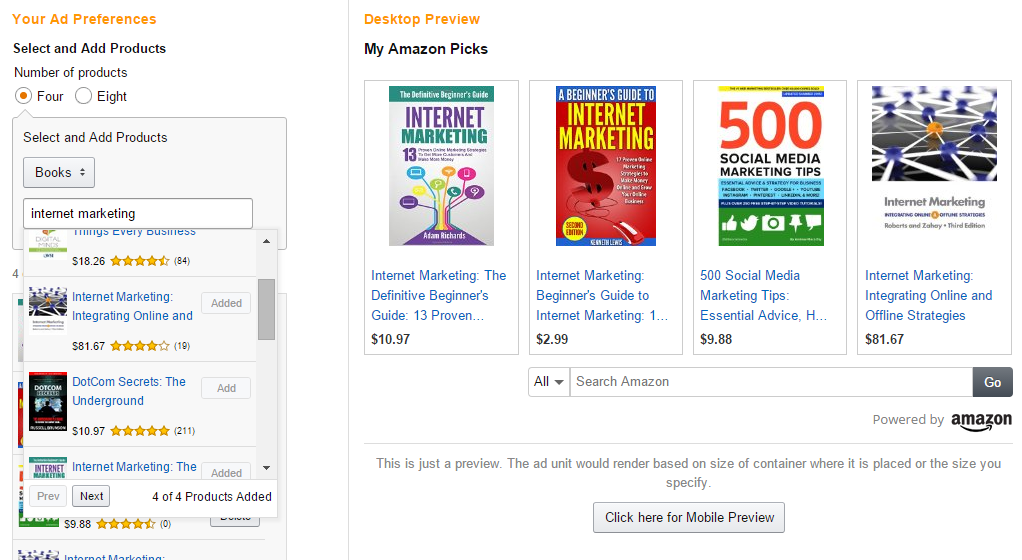
  1. Decide whether you want to show four products or eight
  2. Choose which category you want your products to be from (books or music for example)
  3. Add a search term
  4. Select  your desired products
  5. Copy and paste the code
2

Amazon screenshot

You can see above that I have chosen to have four products from the book department of Amazon on the subject of internet marketing.

I have selected four I want to show from the drop down that appeared and they are now showing on the right hand side of the page. All I need to do now is copy and paste the code. But there are advanced options too:
3

Amazon screenshot

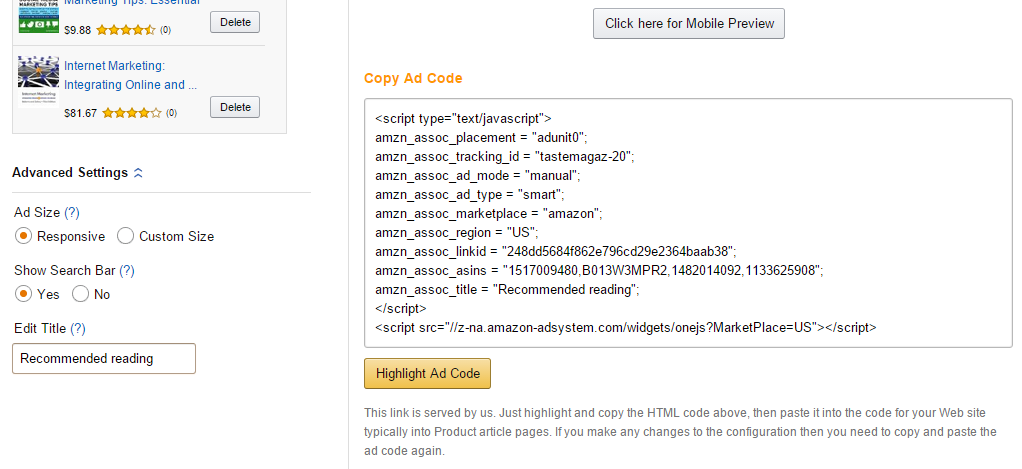
You can see on the left of the above screenshot that I have clicked the ‘advanced settings’ link to display the options. By default,the option is for responsive ads which you’ll more than likely leave because they will automatically resize for cellphones, tablets etc. I can also choose whether to show the search bar. Amazon suggest that it should remain because it creates another monetising opportunity. I didn’t like the default title (which I think was ‘My Picks’) so I changed it to ‘Recommended Reading’.

Done. Copy and paste the code.

Note that you can also preview your ad as it will appear on cellphones. See below.

4


Now scroll down to see how good they look 🙂

ABOUT THE AUTHOR 

Jackie Jackson, also known online as BritFlorida, is a highly experienced designer and writer. British born and now living in the USA, she specialises in lifestyle issues, design and quirky stories. You can see a wide range of articles here, or visit her website Tastes Magazine. See The Writer’s Door for more information.


Author: Jackie Jackson

Share This Post On

5 Comments

  1. I tried to do this with a Halloween blog, and could not get it done this way.

    I like the way it looks….nice and neat!

  2. Thanks Jackie for the help. I tried creating one for my Bing Crosby article but no code showed up on the right side. I’ll have to try next time, As always thanks for the help.

    • Sam, I wonder if trying a different browser could be worth a try? Keep trying – these new ads look great!

      • As Always Thanks for the help, and you were right I tried in a different browser and it works just fine 🙂

        • That’s great, Sam 🙂

Submit a Comment

news-1701

yakinjp

MAUJP

MAUJP

MAUJP

SATGASJITU

SLOT GACOR

SALAMJITU

SATGASJITU

SEMOGAJITU

SALAMJITU

Slot Gacor

MAUJP

Slot Gacor

SLOT GACOR

artikel 000000101

artikel 000000102

artikel 000000103

artikel 000000104

artikel 000000105

artikel 000000106

artikel 000000107

artikel 000000108

artikel 000000109

artikel 000000110

artikel 000000111

artikel 000000112

artikel 000000113

artikel 000000114

artikel 000000115

artikel 000000116

artikel 000000117

artikel 000000118

artikel 000000119

artikel 000000120

artikel 000000121

artikel 000000122

artikel 000000123

artikel 000000124

artikel 000000125

artikel 000000126

artikel 000000127

artikel 000000128

artikel 000000129

artikel 000000130

artikel 000000131

artikel 000000132

artikel 000000133

artikel 000000134

artikel 000000135

artikel 000000136

artikel 000000137

artikel 000000138

artikel 000000139

artikel 000000140

artikel 000000141

artikel 000000142

artikel 000000143

artikel 000000144

artikel 000000145

artikel 000000146

artikel 000000147

artikel 000000148

artikel 000000149

artikel 000000150

artikel 000000151

artikel 000000152

artikel 000000153

artikel 000000154

artikel 000000155

artikel 000000156

artikel 000000157

artikel 000000158

artikel 000000159

artikel 000000160

artikel 000000161

artikel 000000162

artikel 000000163

artikel 000000164

artikel 000000165

artikel 000000166

artikel 000000167

artikel 000000168

artikel 000000169

artikel 000000170

artikel 000000171

artikel 000000172

artikel 000000173

artikel 000000174

artikel 000000175

informasi terbaru kabupaten belu 00000056

informasi terbaru kabupaten belu 00000057

informasi terbaru kabupaten belu 00000058

informasi terbaru kabupaten belu 00000059

informasi terbaru kabupaten belu 00000060

informasi terbaru kabupaten belu 00000061

informasi terbaru kabupaten belu 00000062

informasi terbaru kabupaten belu 00000063

informasi terbaru kabupaten belu 00000064

informasi terbaru kabupaten belu 00000065

informasi terbaru kabupaten belu 00000066

informasi terbaru kabupaten belu 00000067

informasi terbaru kabupaten belu 00000068

informasi terbaru kabupaten belu 00000069

informasi terbaru kabupaten belu 00000070

informasi terbaru kabupaten belu 00000071

informasi terbaru kabupaten belu 00000072

informasi terbaru kabupaten belu 00000073

informasi terbaru kabupaten belu 00000074

informasi terbaru kabupaten belu 00000075

informasi terbaru kabupaten belu 00000076

informasi terbaru kabupaten belu 00000077

informasi terbaru kabupaten belu 00000078

informasi terbaru kabupaten belu 00000079

informasi terbaru kabupaten belu 00000080

informasi terbaru kabupaten belu 00000081

informasi terbaru kabupaten belu 00000082

informasi terbaru kabupaten belu 00000083

informasi terbaru kabupaten belu 00000084

informasi terbaru kabupaten belu 00000085

informasi terbaru kabupaten belu 00000086

informasi terbaru kabupaten belu 00000087

informasi terbaru kabupaten belu 00000088

informasi terbaru kabupaten belu 00000089

informasi terbaru kabupaten belu 00000090

informasi terbaru kabupaten belu 00000091

informasi terbaru kabupaten belu 00000092

informasi terbaru kabupaten belu 00000093

informasi terbaru kabupaten belu 00000094

informasi terbaru kabupaten belu 00000095

informasi terbaru kabupaten belu 00000096

informasi terbaru kabupaten belu 00000097

informasi terbaru kabupaten belu 00000098

informasi terbaru kabupaten belu 00000099

informasi terbaru kabupaten belu 00000100

informasi terbaru kabupaten belu 00000101

informasi terbaru kabupaten belu 00000102

informasi terbaru kabupaten belu 00000103

informasi terbaru kabupaten belu 00000104

informasi terbaru kabupaten belu 00000105

informasi terbaru kabupaten belu 00000106

informasi terbaru kabupaten belu 00000107

informasi terbaru kabupaten belu 00000108

informasi terbaru kabupaten belu 00000109

informasi terbaru kabupaten belu 00000110

informasi terbaru kabupaten belu 00000111

informasi terbaru kabupaten belu 00000112

informasi terbaru kabupaten belu 00000113

informasi terbaru kabupaten belu 00000114

informasi terbaru kabupaten belu 00000115

informasi terbaru kabupaten belu 00000116

informasi terbaru kabupaten belu 00000117

informasi terbaru kabupaten belu 00000118

informasi terbaru kabupaten belu 00000119

informasi terbaru kabupaten belu 00000120

informasi terbaru kabupaten belu 00000121

informasi terbaru kabupaten belu 00000122

informasi terbaru kabupaten belu 00000123

informasi terbaru kabupaten belu 00000124

informasi terbaru kabupaten belu 00000125

informasi terbaru kabupaten belu 00000126

informasi terbaru kabupaten belu 00000127

informasi terbaru kabupaten belu 00000128

informasi terbaru kabupaten belu 00000129

informasi terbaru kabupaten belu 00000130

news-1701