
iPhone Photography 101 – Silhouettes and Sunshine

Pin It

iPhone Photography 101 – Silhouettes and Sunshine.

As a beach photographer I find that I’m constantly looking for new ways to make my sunrise shots memorable. I take photographs every day, regardless of the weather, and I try to find different ways of capturing the moment. Silhouettes have become an important part of my workflow and have played a part in creating some very dramatic photographs.

Here in Florida a bright sun is a major feature of the dawn landscape. The morning is a great time to take photographs, as the color and direction of the sunlight is much more useful to work with. The clouds can provide a fabulous backdrop, but if the sun is bright, what then?

With cellphone photography the usual tricks that photographers use to cope with the brighter light – changing shutter speed and aperture settings, using bracketing techniques – can’t be applied. But there are lots of ways to make the most of things.
IMG_9031

Shade and Shadows

At such times I take a look around for shade and for shadows. If a subject needs a little fill-in light, this is the time to use your camera’s flash, or work with a reflector (a good tip is to use a car window sunshade – the silver reflective finish is perfect) to throw a little ambient light around. If you are with friends, ask them to put their phone on torch-mode and add a little extra light source.

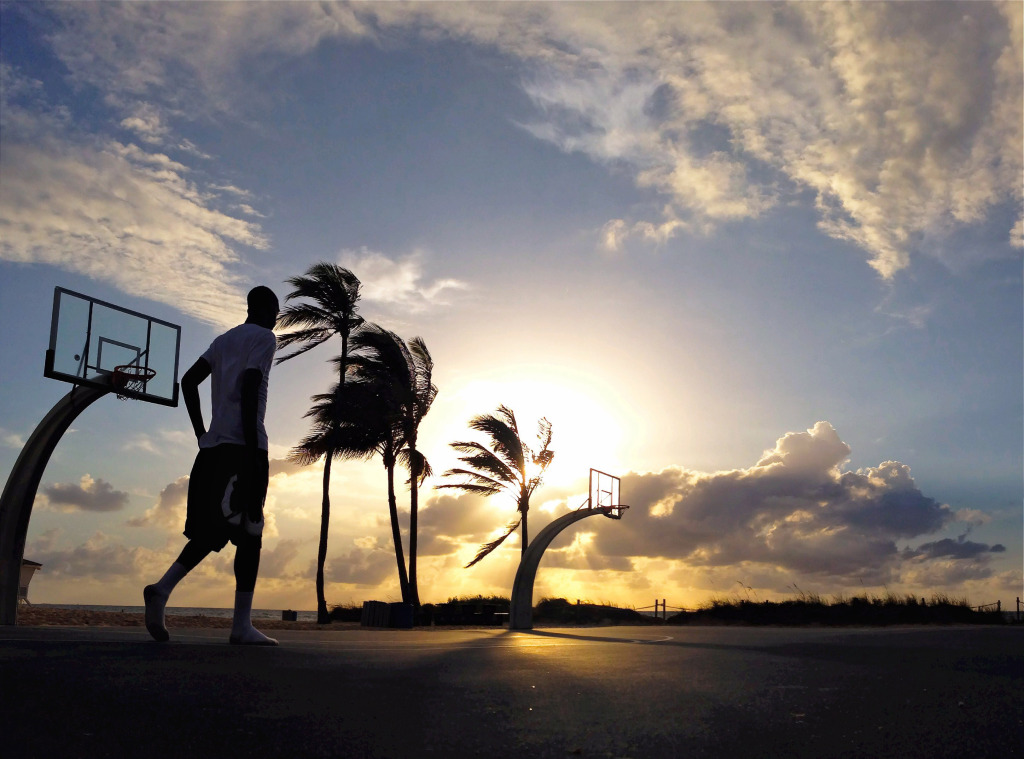
But when the sun is quite strong, then a silhouette is an excellent solution. A good silhouette generally consists of a distinct dark outline against a bright background. With the sun low and bright you can achieve images of great drama and power by simply standing back and looking.

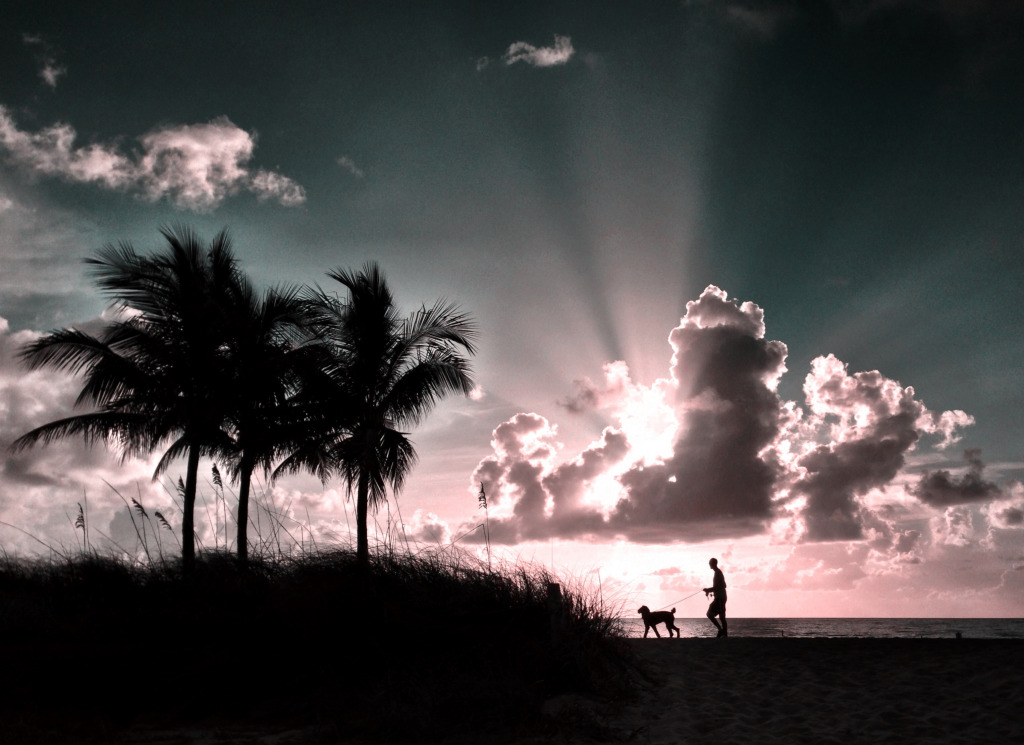
Look particularly for shape and contrast in a scene and you can open up all sorts of new avenues. Suddenly a passerby isn’t just a nuisance walking into shot, they can add scale and character to an already dramatic situation. Shape here is everything, so look to isolate the best ones.
WalkOfLife

Thinking Ahead

A great photograph sometimes takes a little advanced knowledge. I shoot the same patch of beach so I know the best vantage points and angles. So if my subject – say a man walking a dog – is walking across the scene I know when to move to bring out the best in the scene.

If you are travelling to an unfamiliar location, do a little advance thinking and plan ahead; As you walk around make a note of good vistas and dramatic scenes and return to those places where you know that the morning or evening sun will create the most drama. A wonderful app to use on your image making trips is TPE – The Photographer’s Ephemeris, which lets you calculate sunshine angles at any time of day from any location – good for both landscapes and cityscapes.
Contasting16

Step Into the Shadows

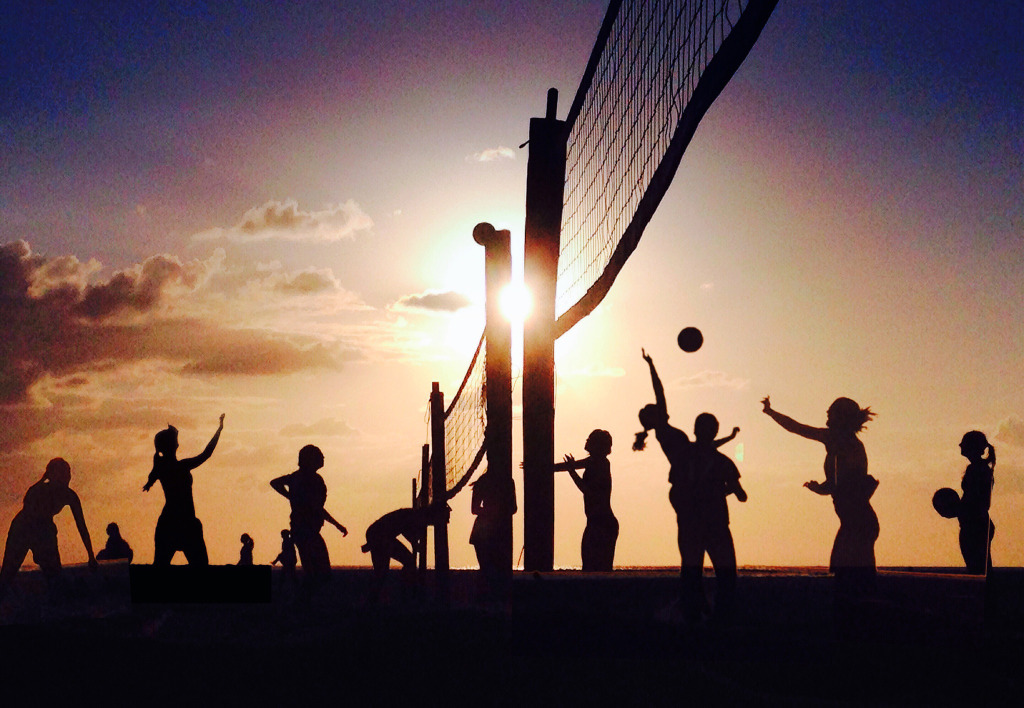
Ultimately the best silhouettes are created by putting the sun right behind the subject. I’ve developed the habit of looking for strong shadows and stepping into them to see what kind of shapes are being created. A strong subject is always going to make for a strong result, providing you can isolate the shapes. People are always great additions, whether near to the camera or far away, so if you are with friends, or have eager children make good use of them. Kids can be the best models for silhouettes so have a little fun, get them leaping around…

IMG_1538

 In The Frame

Framing is so important – sometimes elements can be placed into shot from the edges to add a good counterpoint – a branch of a tree, maybe, or the shape of a building. Not only can this add to the shot but it can also be a great way to block direct sunlight.

Keeping things simple works best, though. An uncluttered scene can help the eye concentrate on the subject so much more. I sometimes find a perfect scene and then wait for someone or something to move into shot. A human presence in an already dramatic scene can transform the whole picture.

Contasting 6

Tap and tilt

If you are shooting with a cellphone, as most people do these days, tapping the screen at the point of most contrast can help the camera adjust to the best exposure. My maxim is tap to focus, tilt to expose. Sometimes altering the angle of your camera lens can make all the difference, helping the contrast and colors so that the image is so much richer and sharper.

IMG_0274

Look for the details

Do try different angles so that you can pick out partially silhouetted features. It might not be immediately clear when you are taking the photograph but sometimes you can see details later on that are well work accentuating with some app work afterwards. Take lots of shots – in this digital world there’s no need to limit yourself to one or two images of a given scene. Try five, ten or more if you know that there’s something interesting to capture.

Finally if you can work on the image afterwards try different effects and tints. I use apps like Camera+, Snapseed, iColorama, and Laminar to play with the possibilities. Darkening an image slightly, then adding contrast and filter effects creates all kinds of power and drama. Get to know a favourite app and push the limits of what you know. You may have an award winner just sitting there on your phone. Just waiting for that finishing touch!

Down Fisherman's Way.


ABOUT THE AUTHOR

Andy Royston is a designer, artist and photoblogger based in Fort Lauderdale, Florida. Veteran of the London 1980s music scene, where he designed record sleeves for all kinds of rock stars and indie heroes he is a bottomless pit of musical trivia. Still looking for the next big thing he’ll be dropping into JAQUO.COM to write an irregular column on the musicians he’s most excited about.

Author: Jackie Jackson

Share This Post On

Submit a Comment

news-1701

yakinjp

MAUJP

MAUJP

MAUJP

SATGASJITU

SLOT GACOR

SALAMJITU

SATGASJITU

SEMOGAJITU

SALAMJITU

Slot Gacor

MAUJP

Slot Gacor

SLOT GACOR

artikel 000000101

artikel 000000102

artikel 000000103

artikel 000000104

artikel 000000105

artikel 000000106

artikel 000000107

artikel 000000108

artikel 000000109

artikel 000000110

artikel 000000111

artikel 000000112

artikel 000000113

artikel 000000114

artikel 000000115

artikel 000000116

artikel 000000117

artikel 000000118

artikel 000000119

artikel 000000120

artikel 000000121

artikel 000000122

artikel 000000123

artikel 000000124

artikel 000000125

artikel 000000126

artikel 000000127

artikel 000000128

artikel 000000129

artikel 000000130

artikel 000000131

artikel 000000132

artikel 000000133

artikel 000000134

artikel 000000135

artikel 000000136

artikel 000000137

artikel 000000138

artikel 000000139

artikel 000000140

artikel 000000141

artikel 000000142

artikel 000000143

artikel 000000144

artikel 000000145

artikel 000000146

artikel 000000147

artikel 000000148

artikel 000000149

artikel 000000150

artikel 000000151

artikel 000000152

artikel 000000153

artikel 000000154

artikel 000000155

artikel 000000156

artikel 000000157

artikel 000000158

artikel 000000159

artikel 000000160

artikel 000000161

artikel 000000162

artikel 000000163

artikel 000000164

artikel 000000165

artikel 000000166

artikel 000000167

artikel 000000168

artikel 000000169

artikel 000000170

artikel 000000171

artikel 000000172

artikel 000000173

artikel 000000174

artikel 000000175

informasi terbaru kabupaten belu 00000056

informasi terbaru kabupaten belu 00000057

informasi terbaru kabupaten belu 00000058

informasi terbaru kabupaten belu 00000059

informasi terbaru kabupaten belu 00000060

informasi terbaru kabupaten belu 00000061

informasi terbaru kabupaten belu 00000062

informasi terbaru kabupaten belu 00000063

informasi terbaru kabupaten belu 00000064

informasi terbaru kabupaten belu 00000065

informasi terbaru kabupaten belu 00000066

informasi terbaru kabupaten belu 00000067

informasi terbaru kabupaten belu 00000068

informasi terbaru kabupaten belu 00000069

informasi terbaru kabupaten belu 00000070

informasi terbaru kabupaten belu 00000071

informasi terbaru kabupaten belu 00000072

informasi terbaru kabupaten belu 00000073

informasi terbaru kabupaten belu 00000074

informasi terbaru kabupaten belu 00000075

informasi terbaru kabupaten belu 00000076

informasi terbaru kabupaten belu 00000077

informasi terbaru kabupaten belu 00000078

informasi terbaru kabupaten belu 00000079

informasi terbaru kabupaten belu 00000080

informasi terbaru kabupaten belu 00000081

informasi terbaru kabupaten belu 00000082

informasi terbaru kabupaten belu 00000083

informasi terbaru kabupaten belu 00000084

informasi terbaru kabupaten belu 00000085

informasi terbaru kabupaten belu 00000086

informasi terbaru kabupaten belu 00000087

informasi terbaru kabupaten belu 00000088

informasi terbaru kabupaten belu 00000089

informasi terbaru kabupaten belu 00000090

informasi terbaru kabupaten belu 00000091

informasi terbaru kabupaten belu 00000092

informasi terbaru kabupaten belu 00000093

informasi terbaru kabupaten belu 00000094

informasi terbaru kabupaten belu 00000095

informasi terbaru kabupaten belu 00000096

informasi terbaru kabupaten belu 00000097

informasi terbaru kabupaten belu 00000098

informasi terbaru kabupaten belu 00000099

informasi terbaru kabupaten belu 00000100

informasi terbaru kabupaten belu 00000101

informasi terbaru kabupaten belu 00000102

informasi terbaru kabupaten belu 00000103

informasi terbaru kabupaten belu 00000104

informasi terbaru kabupaten belu 00000105

informasi terbaru kabupaten belu 00000106

informasi terbaru kabupaten belu 00000107

informasi terbaru kabupaten belu 00000108

informasi terbaru kabupaten belu 00000109

informasi terbaru kabupaten belu 00000110

informasi terbaru kabupaten belu 00000111

informasi terbaru kabupaten belu 00000112

informasi terbaru kabupaten belu 00000113

informasi terbaru kabupaten belu 00000114

informasi terbaru kabupaten belu 00000115

informasi terbaru kabupaten belu 00000116

informasi terbaru kabupaten belu 00000117

informasi terbaru kabupaten belu 00000118

informasi terbaru kabupaten belu 00000119

informasi terbaru kabupaten belu 00000120

informasi terbaru kabupaten belu 00000121

informasi terbaru kabupaten belu 00000122

informasi terbaru kabupaten belu 00000123

informasi terbaru kabupaten belu 00000124

informasi terbaru kabupaten belu 00000125

informasi terbaru kabupaten belu 00000126

informasi terbaru kabupaten belu 00000127

informasi terbaru kabupaten belu 00000128

informasi terbaru kabupaten belu 00000129

informasi terbaru kabupaten belu 00000130

news-1701