
Windows 10: Using Multiple Desktops

Pin It

Working more efficiently with virtual desktops on Windows 10.

I have to report that I’m really enjoying using Windows 10 to date. At first, the upgrade seemed to be more cosmetic than anything (pretty is good!) but further exploration shows that you productivity can be hugely increased using various new features.

The multiple virtual desktops feature is one of my favourites. You can access existing desktops or create new ones by clicking the icon on the left hand side of the bottom tool bar.

2015-09-01_1105

I’ve never loved Windows. I’ve always disliked Microsoft Explorer. I’m happy to work on a Mac or a PC and I have no loyalties to any company. But the multiple desktop features helps me work faster – which I love.

I have two set up at the moment. When I click on the left hand icon, this is what I see:

Screenshot (1)

As you can see, there are three immediate things I can do. In the bottom section, two desktops are showing. I can choose which one I want to go to, or I can create a new one by clicking on the + on the right. (To close a desktop, use the X above the desktop icon).

So let’s go to desktop one:
desktop2

____

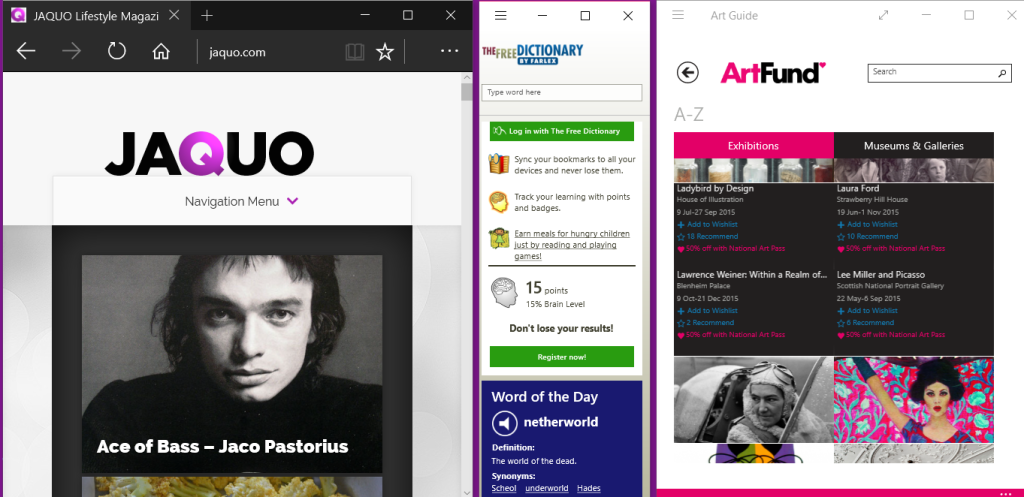
Of course, everyone will arrange their desktops to suit their own needs and this is perfect for me. Anyone who knows that I’ve always hated Explorer will be surprised to see that I have the new Microsoft Edge browser there.

Actually, it’s excellent. Minimal, easy to use and automatically gives you the knowledge of how websites appear on phones and tablets. (It has other great features which will be the subject of another article). Because it is permanently on the desktop,I can check newly published JAQUO articles.

I also like to have a dictionary app available – that the one you see in the middle. Depending on what I’m working on, I have a relevant app open too. Here, because I’m researching information for articles for the art section of this site, I have a relevant app open. You could say that this is my ‘research desktop’.

Here’s the other one:
desktop1

____

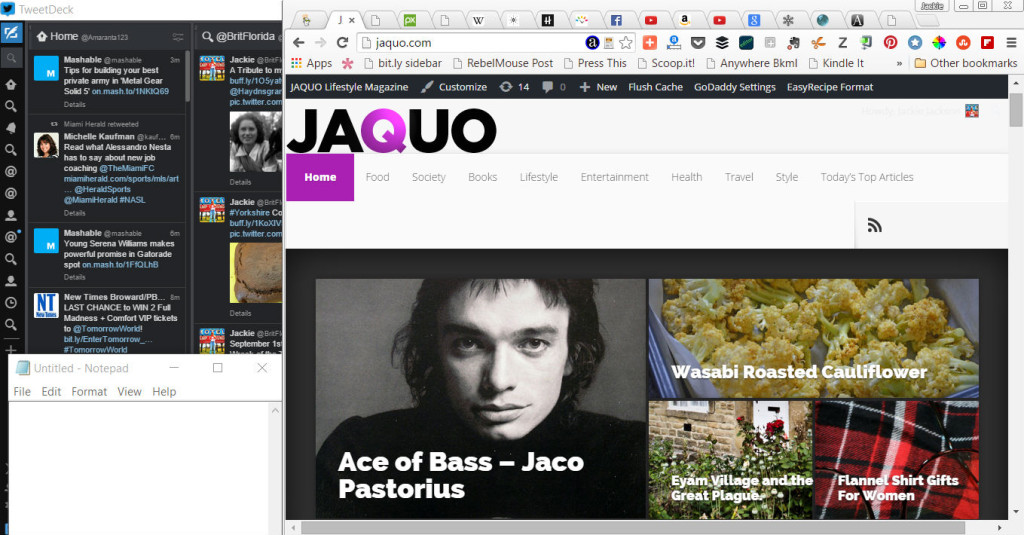
Here I have the three items I use all the time.They are:

  • Google Chrome browser with several sites open. (Usually email, Wikipedia, YouTube, Amazon etc.) These are the tools of my trade, yours will be different.
  • The essential Tweetdeck. That’s it on the left. When I am working in the browser, as I am this very second, I can still see news popping up on the Tweetdeck.  Even though I’m working,I can still respond to mentions, retweet, quote tweets and so on easily, plus keep up to date with the news and my interests.
  • Bottom left is good old Notebook which I use many times a day to strip excess coding or to write notes.

These are the basics I need and I can easily switch from ‘research mode’ to ‘work mode’ so quickly without opening additional windows or programs.

To speed up working, I’ve always liked the Alt + Tab feature and now you can switch between your various desktops by using Window Key + Tab.

To add items to your desktops simply open the program or app when your using that particular desktop. It will remain there until you close it. Moving a program or app from one desktop to another is simplicity itself and takes one second. Just right-click it. See below:

Screenshot (3)
Another shortcut, if you have a touch screen, is that you can switch and access desktops by swiping from the left.

All in all, this is a feature that can speed up your working day considerably.


 ABOUT THE AUTHOR

Jackie Jackson, also known online as BritFlorida, is a highly experienced designer and writer. British born and now living in the USA, she specialises in lifestyle issues, design and quirky stories. You can see a wide range of articles here, or visit her website Tastes Magazine. See The Writer’s Door for more information.

Author: Jackie Jackson

Share This Post On

3 Comments

  1. Jackie, I’m certainly due for an upgrade, but have been waiting. This really helps to push me along, as I work 10 or 11 hours a day. this gives limited time on line, very often I only have a few hours on line after work. As Always thanks for keeping us updated 🙂

  2. Wow, I really like this! I’ve been holding off on Windows 10, but the more I learn from you, Jackie, the more I want to dive right into it. I take it this was pretty easy to learn?

    • I’m really enjoying it, Susan. It helps me to work faster and that’s always good! It’s very easy and pretty intuitive. Lots of fun 🙂

Submit a Comment

news-1701

yakinjp

MAUJP

MAUJP

MAUJP

SATGASJITU

SLOT GACOR

SALAMJITU

SATGASJITU

SEMOGAJITU

SALAMJITU

Slot Gacor

MAUJP

Slot Gacor

SLOT GACOR

artikel 000000101

artikel 000000102

artikel 000000103

artikel 000000104

artikel 000000105

artikel 000000106

artikel 000000107

artikel 000000108

artikel 000000109

artikel 000000110

artikel 000000111

artikel 000000112

artikel 000000113

artikel 000000114

artikel 000000115

artikel 000000116

artikel 000000117

artikel 000000118

artikel 000000119

artikel 000000120

artikel 000000121

artikel 000000122

artikel 000000123

artikel 000000124

artikel 000000125

artikel 000000126

artikel 000000127

artikel 000000128

artikel 000000129

artikel 000000130

artikel 000000131

artikel 000000132

artikel 000000133

artikel 000000134

artikel 000000135

artikel 000000136

artikel 000000137

artikel 000000138

artikel 000000139

artikel 000000140

artikel 000000141

artikel 000000142

artikel 000000143

artikel 000000144

artikel 000000145

artikel 000000146

artikel 000000147

artikel 000000148

artikel 000000149

artikel 000000150

artikel 000000151

artikel 000000152

artikel 000000153

artikel 000000154

artikel 000000155

artikel 000000156

artikel 000000157

artikel 000000158

artikel 000000159

artikel 000000160

artikel 000000161

artikel 000000162

artikel 000000163

artikel 000000164

artikel 000000165

artikel 000000166

artikel 000000167

artikel 000000168

artikel 000000169

artikel 000000170

artikel 000000171

artikel 000000172

artikel 000000173

artikel 000000174

artikel 000000175

informasi terbaru kabupaten belu 00000056

informasi terbaru kabupaten belu 00000057

informasi terbaru kabupaten belu 00000058

informasi terbaru kabupaten belu 00000059

informasi terbaru kabupaten belu 00000060

informasi terbaru kabupaten belu 00000061

informasi terbaru kabupaten belu 00000062

informasi terbaru kabupaten belu 00000063

informasi terbaru kabupaten belu 00000064

informasi terbaru kabupaten belu 00000065

informasi terbaru kabupaten belu 00000066

informasi terbaru kabupaten belu 00000067

informasi terbaru kabupaten belu 00000068

informasi terbaru kabupaten belu 00000069

informasi terbaru kabupaten belu 00000070

informasi terbaru kabupaten belu 00000071

informasi terbaru kabupaten belu 00000072

informasi terbaru kabupaten belu 00000073

informasi terbaru kabupaten belu 00000074

informasi terbaru kabupaten belu 00000075

informasi terbaru kabupaten belu 00000076

informasi terbaru kabupaten belu 00000077

informasi terbaru kabupaten belu 00000078

informasi terbaru kabupaten belu 00000079

informasi terbaru kabupaten belu 00000080

informasi terbaru kabupaten belu 00000081

informasi terbaru kabupaten belu 00000082

informasi terbaru kabupaten belu 00000083

informasi terbaru kabupaten belu 00000084

informasi terbaru kabupaten belu 00000085

informasi terbaru kabupaten belu 00000086

informasi terbaru kabupaten belu 00000087

informasi terbaru kabupaten belu 00000088

informasi terbaru kabupaten belu 00000089

informasi terbaru kabupaten belu 00000090

informasi terbaru kabupaten belu 00000091

informasi terbaru kabupaten belu 00000092

informasi terbaru kabupaten belu 00000093

informasi terbaru kabupaten belu 00000094

informasi terbaru kabupaten belu 00000095

informasi terbaru kabupaten belu 00000096

informasi terbaru kabupaten belu 00000097

informasi terbaru kabupaten belu 00000098

informasi terbaru kabupaten belu 00000099

informasi terbaru kabupaten belu 00000100

informasi terbaru kabupaten belu 00000101

informasi terbaru kabupaten belu 00000102

informasi terbaru kabupaten belu 00000103

informasi terbaru kabupaten belu 00000104

informasi terbaru kabupaten belu 00000105

informasi terbaru kabupaten belu 00000106

informasi terbaru kabupaten belu 00000107

informasi terbaru kabupaten belu 00000108

informasi terbaru kabupaten belu 00000109

informasi terbaru kabupaten belu 00000110

informasi terbaru kabupaten belu 00000111

informasi terbaru kabupaten belu 00000112

informasi terbaru kabupaten belu 00000113

informasi terbaru kabupaten belu 00000114

informasi terbaru kabupaten belu 00000115

informasi terbaru kabupaten belu 00000116

informasi terbaru kabupaten belu 00000117

informasi terbaru kabupaten belu 00000118

informasi terbaru kabupaten belu 00000119

informasi terbaru kabupaten belu 00000120

informasi terbaru kabupaten belu 00000121

informasi terbaru kabupaten belu 00000122

informasi terbaru kabupaten belu 00000123

informasi terbaru kabupaten belu 00000124

informasi terbaru kabupaten belu 00000125

informasi terbaru kabupaten belu 00000126

informasi terbaru kabupaten belu 00000127

informasi terbaru kabupaten belu 00000128

informasi terbaru kabupaten belu 00000129

informasi terbaru kabupaten belu 00000130

news-1701