
Windows 10: Using Microsoft Edge

Pin It

Microsoft has made a great browser — at last.

I’m not joking. For over twenty years – almost my entire internet life – I have genuinely hated Microsoft’s Internet Explorer. I mean, hated. So when I started using Windows 10, I fully expected to delete the supplied browser from my system in order to free up space.

I’m so glad I didn’t. Believe it or not, it’s a splendid browser. Aesthetically, it’s perfect; minimal and spare. And if I like this browser, then those people who liked IE (or at least, tolerated it)  are bound to enjoy using Microsoft Edge. Here’s a screenshot.

Microsoft Edge

Note that you can have the option of the dark browser (as seen above) or the light. That’s all that’s needed, I think we all got over fancy skins a long time ago. As a web designer, I love the way that there are no bells and whistles to distract the viewer from my carefully designed content.

But what about functionality?

That’s what most users are concerned about. Well, Edge is fast and zippy plus it has several features you’ll enjoy.

2015-09-01_1529
Even when you have minimised your browser (this screenshot shows it at just over 400 pixels wide) responsive sites look fantastic and work well. This means that even if you have a small screen, as I do on my laptop, there is still room for other apps to be displayed alongside. See below.
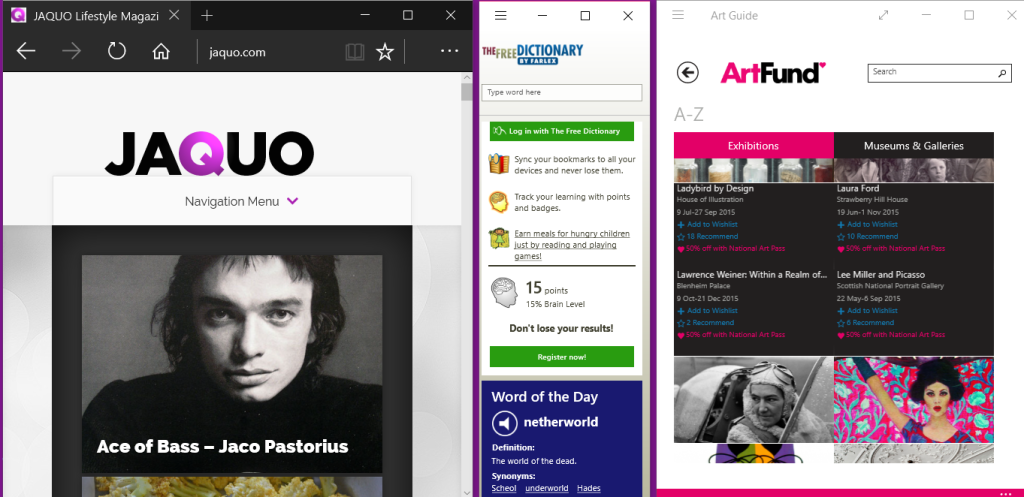
desktop2

A feature that will be loved by viewers, but hated by those sites that are chock-a-bloc with ads, is the reading view. This strips away ads and extraneous content and simply lets you concentrate on reading the article.

Read_mode_2

As you can see in the screenshot above, there are no annoying ads or flashing annoyances. This might be bad news for marketers but for content writers it’s wonderful to think that people have an option to actually read what you’ve written without being distracted. The read view doesn’t show videos which is something Microsoft may wish to reconsider in future but images remain as you can see in the screenshot below.

read_mode

This means that if your articles feature maps or infographics your viewers will still see them.

Sharing

The read view also does not show share buttons but this isn’t a problem because Microsoft Edge has a built-in share system that is actually easier to use. Have you ever been to a website that you’d love to share with your contacts and followers but the webmaster has neglected to supply buttons on the site? Or maybe you’d love to share on LinkedIn but that’s the one button that’s not been supplied.

That’s no problem with Edge.

In the previous screenshots, you’ll have noticed the toolbar’s three dots on the right. Click on that and you’ll see configurable sharing options.

Screenshot (4)

On the right column of the above screenshot, you’ll see that I have configured mine to share to various social media and apps. Setting up other sharing (Pinterest, Scoop, Stumbleupon, Tumblr etc) is simply  matter of installing the apps. It takes only seconds to do.

Commenting and sharing

I have to admit that at first, I thought the ‘make a webnote’ feature was just a nice little gimmick. But it’s far more powerful than I realised. By using the top right navigation you can add notes, text and symbols to any web page or article.

2015-09-01_1533

As you can see above, we now have a new toolbar. Using it you can:

  • Make notes on the webpage
  • Highlight areas
  • Delete your notes
  • Cut out your chosen area
  • Save and share your comments

I’m finding this useful to check my own articles and make a note, such as ‘typo here!’ But think about that sharing option. I can send it to myself (save it to One Note or Evernote for example) or save it on my computer. See below.

draw

Or I can quickly create a graphic (I especially like this) that I can share on social media. For example, imagine that you have written an article recommending a particular book. You find that it’s free to Kindle users for a limited period. Take thirty seconds to make a note on your article and Tweet, Facebook or pin the result.Like this.

social_media

You can see how this creates a teaser. It only shows a portion of the article, some of the words are obscured by the note — people seeing it will want to know more so because you’ve added the URL of your article to your message, they’ll be inclined to click to find out more. Of course, there are personal applications for this feature too. Email or text your annotated browser screenshot to a friend, like this:

gift

There are plenty of other great features about Edge too, such as creating reading lists using the star icon on the toolbar. And you can personalise the start screen (now called ‘the hub’) to show the news and info you want to see. See below.

start_screen

I’m not quite prepared to give up Google Chrome yet because over the years I’ve added so many apps and add-ons that I use every day.But I already find that I’m using Edge roughly fifty percent of the time.

Because it is a fairly recent release, I imagine that the browser will be improved even further as time goes on. Who knows, one day I might be using a Microsoft browser only!


If you’d like to read about the virtual desktop feature in Windows 10, click here.


 ABOUT THE AUTHOR

Jackie Jackson, also known online as BritFlorida, is a highly experienced designer and writer. British born and now living in the USA, she specialises in lifestyle issues, design and quirky stories. You can see a wide range of articles here, or visit her website Tastes Magazine. See The Writer’s Door for more information.

Author: Jackie Jackson

Share This Post On

1 Comment

  1. Jackie, thanks so much for these terrific tips on the new Edge browser. I hadn’t used it much since getting it with my Windows 10 OS upgrade, but you’ve given me several good reasons to start.

Submit a Comment

news-1701

yakinjp

MAUJP

MAUJP

MAUJP

SATGASJITU

SLOT GACOR

SALAMJITU

SATGASJITU

SEMOGAJITU

SALAMJITU

Slot Gacor

MAUJP

Slot Gacor

SLOT GACOR

artikel 000000101

artikel 000000102

artikel 000000103

artikel 000000104

artikel 000000105

artikel 000000106

artikel 000000107

artikel 000000108

artikel 000000109

artikel 000000110

artikel 000000111

artikel 000000112

artikel 000000113

artikel 000000114

artikel 000000115

artikel 000000116

artikel 000000117

artikel 000000118

artikel 000000119

artikel 000000120

artikel 000000121

artikel 000000122

artikel 000000123

artikel 000000124

artikel 000000125

artikel 000000126

artikel 000000127

artikel 000000128

artikel 000000129

artikel 000000130

artikel 000000131

artikel 000000132

artikel 000000133

artikel 000000134

artikel 000000135

artikel 000000136

artikel 000000137

artikel 000000138

artikel 000000139

artikel 000000140

artikel 000000141

artikel 000000142

artikel 000000143

artikel 000000144

artikel 000000145

artikel 000000146

artikel 000000147

artikel 000000148

artikel 000000149

artikel 000000150

artikel 000000151

artikel 000000152

artikel 000000153

artikel 000000154

artikel 000000155

artikel 000000156

artikel 000000157

artikel 000000158

artikel 000000159

artikel 000000160

artikel 000000161

artikel 000000162

artikel 000000163

artikel 000000164

artikel 000000165

artikel 000000166

artikel 000000167

artikel 000000168

artikel 000000169

artikel 000000170

artikel 000000171

artikel 000000172

artikel 000000173

artikel 000000174

artikel 000000175

informasi terbaru kabupaten belu 00000056

informasi terbaru kabupaten belu 00000057

informasi terbaru kabupaten belu 00000058

informasi terbaru kabupaten belu 00000059

informasi terbaru kabupaten belu 00000060

informasi terbaru kabupaten belu 00000061

informasi terbaru kabupaten belu 00000062

informasi terbaru kabupaten belu 00000063

informasi terbaru kabupaten belu 00000064

informasi terbaru kabupaten belu 00000065

informasi terbaru kabupaten belu 00000066

informasi terbaru kabupaten belu 00000067

informasi terbaru kabupaten belu 00000068

informasi terbaru kabupaten belu 00000069

informasi terbaru kabupaten belu 00000070

informasi terbaru kabupaten belu 00000071

informasi terbaru kabupaten belu 00000072

informasi terbaru kabupaten belu 00000073

informasi terbaru kabupaten belu 00000074

informasi terbaru kabupaten belu 00000075

informasi terbaru kabupaten belu 00000076

informasi terbaru kabupaten belu 00000077

informasi terbaru kabupaten belu 00000078

informasi terbaru kabupaten belu 00000079

informasi terbaru kabupaten belu 00000080

informasi terbaru kabupaten belu 00000081

informasi terbaru kabupaten belu 00000082

informasi terbaru kabupaten belu 00000083

informasi terbaru kabupaten belu 00000084

informasi terbaru kabupaten belu 00000085

informasi terbaru kabupaten belu 00000086

informasi terbaru kabupaten belu 00000087

informasi terbaru kabupaten belu 00000088

informasi terbaru kabupaten belu 00000089

informasi terbaru kabupaten belu 00000090

informasi terbaru kabupaten belu 00000091

informasi terbaru kabupaten belu 00000092

informasi terbaru kabupaten belu 00000093

informasi terbaru kabupaten belu 00000094

informasi terbaru kabupaten belu 00000095

informasi terbaru kabupaten belu 00000096

informasi terbaru kabupaten belu 00000097

informasi terbaru kabupaten belu 00000098

informasi terbaru kabupaten belu 00000099

informasi terbaru kabupaten belu 00000100

informasi terbaru kabupaten belu 00000101

informasi terbaru kabupaten belu 00000102

informasi terbaru kabupaten belu 00000103

informasi terbaru kabupaten belu 00000104

informasi terbaru kabupaten belu 00000105

informasi terbaru kabupaten belu 00000106

informasi terbaru kabupaten belu 00000107

informasi terbaru kabupaten belu 00000108

informasi terbaru kabupaten belu 00000109

informasi terbaru kabupaten belu 00000110

informasi terbaru kabupaten belu 00000111

informasi terbaru kabupaten belu 00000112

informasi terbaru kabupaten belu 00000113

informasi terbaru kabupaten belu 00000114

informasi terbaru kabupaten belu 00000115

informasi terbaru kabupaten belu 00000116

informasi terbaru kabupaten belu 00000117

informasi terbaru kabupaten belu 00000118

informasi terbaru kabupaten belu 00000119

informasi terbaru kabupaten belu 00000120

informasi terbaru kabupaten belu 00000121

informasi terbaru kabupaten belu 00000122

informasi terbaru kabupaten belu 00000123

informasi terbaru kabupaten belu 00000124

informasi terbaru kabupaten belu 00000125

informasi terbaru kabupaten belu 00000126

informasi terbaru kabupaten belu 00000127

informasi terbaru kabupaten belu 00000128

informasi terbaru kabupaten belu 00000129

informasi terbaru kabupaten belu 00000130

news-1701